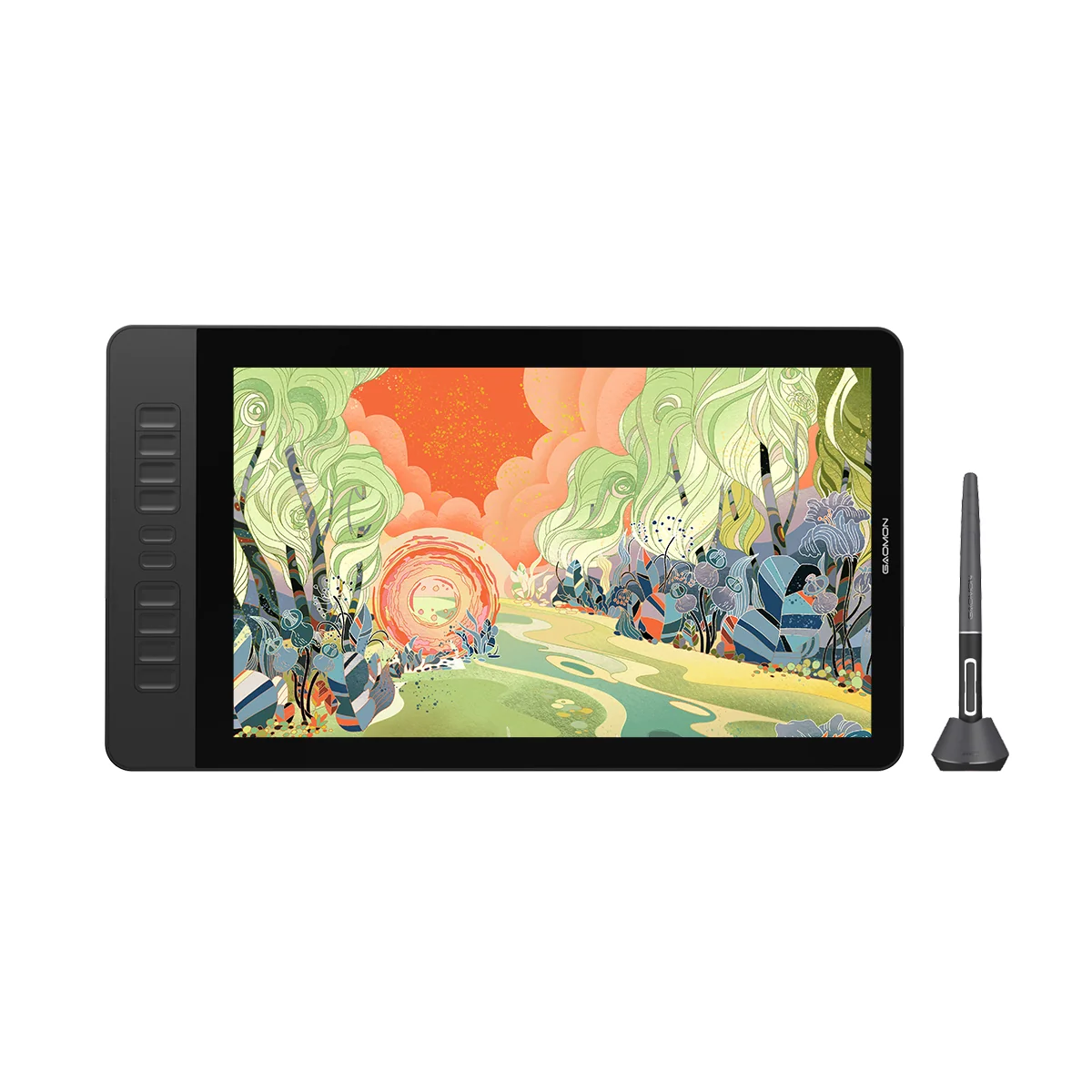
Most of what I do in my spare time revolves around my two major hobbies: programming and art. I often draw in my sketchbook, but I am nominally a digital artist. Most of my proper "finished pieces" are digital works. Making digital art is thankfully easy nowadays; all you need is a computer with software like Photoshop (or the FOSS alternative I use called Krita) and a graphics tablet. My tablet is essentially a screen with a special stylus that, when pressed to the surface, registers a mouse click. It also has nice features like pressure sensitivity and buttons for common commands/hotkeys. While it is technically possible to draw digitally with a mouse or even a trackpad, it's much more ergonomic to imitate the mechanics of traditional art.
I use a graphics tablet called the Gaomon PD1560, which I have used for many years. I spent a lot of time developing my skills and learning the ins and outs of digital painting, and my tablet served me well on this journey. It was friendly and worked wonderfully … until I decided to switch from Windows to Linux. Unfortunately, at the time, Gaomon did not make Linux drivers for their tablets (thankfully they do now), which made adapting my workflow to Linux difficult. I did get the tablet working with a helpful open-source tool called OpenTabletDriver, but this took a lot of configuration before I got it to work, so for a couple of months I needed to boot up Windows whenever I wanted to draw.
All the while, I wondered if I could sidestep this issue by writing my own device driver. I finally decided to pursue this idea as a semester project for my graduate-level operating systems class. You can find the code for the driver on my GitHub.
Device Drivers on Linux
An I/O (Input/Output) device is any device used to interface with a computer and either receive input from the user or emit output to the user. Examples include keyboards, mice, disk drives, printers, and network cards. These devices translate physical actions or data received by the device into a form that software can process without worrying about the low-level hardware or firmware details. They can also send output to the device to perform a function: like the data to display an image on a screen or produce a sound from a speaker. Connecting these devices to a computer requires writing a piece of code called a device driver: a piece of software that acts as a translator between the hardware (physical device) and the operating system by providing a standard interface. With device drivers, the code that manages a file system doesn't need to worry about the specifics of the disk drive that contains its files. On Linux, device drivers are kernel modules: pieces of code that extend the functionality of the kernel, which is the core part of the operating system. These modules can be easily loaded and unloaded without rebooting the system, for example, when a user plugs in a device to a USB port.
Linux is unique with respect to device drivers because it is a "monolithic kernel", meaning device drivers and other kernel modules run in kernel space, unlike on Windows, where they are user programs. Because of this, device drivers are part of the Linux kernel itself: about 60% of the Linux kernel source code is composed of device drivers. Since drivers must run within the kernel, the driver programmer is limited exclusively to libraries in the kernel source code. Driver development can be very risky since if the driver crashes, the entire kernel comes down with it, which was the biggest annoyance I had working on this project.
"Involvement in the development of Linux kernel modules requires a foundation in the C programming language and a track record of creating conventional programs intended for process execution. This pursuit delves into a domain where an unregulated pointer, if disregarded, may potentially trigger the total elimination of an entire filesystem, resulting in a scenario that necessitates a complete system reboot." — Linux Kernel Module Programming Guide.
D:
To mitigate this issue, I did all my development within a VirtualBox instance of Linux Mint identical to the one I use day to day. This probably wouldn't be impossible to do on my actual OS. Since the driver doesn't interact with the filesystem, it probably wouldn't cause the issue mentioned above. But it would be cumbersome to reboot it every time, and it's better to not take chances. Writing this driver required interacting with a few low-level APIs such as the Linux USB subsystem, the Linux input system, and the kernel module API. All code for the project also had to be written in C, which was made even more difficult by the inability to use debuggers or memory analyzers such as Valgrind to check for bugs in memory management.
USB Protocol
Most of my issues in development involved interfacing with the USB subsystem, which is much more complicated than I could have imagined. I'll give a brief and very simplified overview of it here. USB devices are organized in a hierarchical tree, with one "controller device" and many component child devices. Thankfully, I didn't have to deal with this aspect of the protocol since the tablet was modeled as a single USB device, despite having two distinct components that don't interact.
Much of the system for interacting with USBs is already handled by the hardware or other Linux systems. When a new USB device is plugged into a computer, the USB Host Controller or HC Driver will detect it at the hardware level. The device's job is now to translate physical information about the USB into the format of the USB protocol. Then the OS takes over with the generic USB core layer, which communicates the protocol information with device-specific USB drivers, which themselves can then communicate with other system APIs to interact with the file system, network, terminal, etc.
USB devices are structured in a hierarchical fashion. A USB device is assigned a device number on start and will have one or more USB configurations. A USB configuration may have multiple USB functions, each of which provides a common functionality. Each configuration or function may have multiple USB interfaces. For example, a printer may have separate interfaces for printing, scanning, faxing, etc. Typically, each of the separate interfaces of a USB device has its own driver, meaning one USB device can have multiple device drivers.
Each interface will have up to 16 endpoints, which allow communication between the computer and the device. Endpoint 0 is required and the only one that is bidirectional; the others each require a specific direction (in or out) and data type. Endpoints communicate over packets, and each endpoint has a maximum packet size. Drivers also need to be aware of conventions like flagging the end of bulk transfers using "short" (including zero-length) packets. Endpoints are further divided into 4 types:
- Control: request and send small packets used for configuration
- Bulk: request and send larger data packets
- Interrupt: similar to bulk but polled periodically
- Isochronous: send and receive data in real time, used for continuous streams such as video and audio data
Control and Bulk types use bandwidth as it is available and are synchronous, while interrupt and isochronous are scheduled to provide guaranteed bandwidth. Asynchronous transfers use URBs ("USB Request Blocks"), which are packages of data sent to the device to execute a transaction (i.e., to send or receive data).
The first step of this is to allocate a URB and supply it with data to initialize it, before "submitting" it. The way this works is strangely JavaScript-like. Submitting a URB request is an inherently asynchronous operation to which you have to provide a callback function ("completion handler"). We also need to supply a "transfer buffer" for the actual data, accessed by DMA. We also pass a "pipe" argument, which tells which endpoint we are accessing.
Thankfully, most of this complexity wasn't relevant to this project: the tablet had only one device with one configuration, containing two interfaces each with one interrupt endpoint. These were both input endpoints, since a tablet doesn't need to read in any data from the computer; it only sends data about the pen and buttons. (It does technically need to read in data to mirror the display, but this is handled by an HDMI cable and not a USB output).
Writing the Driver
Before even starting work on the driver, I did some research into Linux device drivers and the USB protocol to get an overview of what exactly I needed to accomplish and how. A couple of resources were extremely helpful when starting out: The Linux Kernel Module Programmers Guide, Linux Device Drivers, and the official kernel documentation. I also spent a lot of time looking through the Linux kernel source code on this site, mostly studying other device drivers to see how they worked. This didn't prove fruitful, but I did become very familiar with the cute mascot of the tool the site used to protect against LLM scrapers, so I'd say that was worth it.
My first step was simply to try and detect interactions with the tablet interface over the USB connection. This proved to be the hardest part of the project, but after a lot of hair-pulling, I finally got it to work. My issues here were resolved by modifying a sample USB driver helpfully provided in the Linux kernel instead of trying to do everything from scratch. I learned an important lesson that day, one that every developer learns and then assuredly forgets soon after: never reinvent the wheel. There are no extra points for making something harder for yourself, and the best excuse is that you just got it working.
After conquering that first roadblock, development was actually pretty smooth sailing. I expected that decoding the datastream that the tablet sent out would be a huge headache and the hardest part of this project, but it turned out in fact to be the easiest. Given how it is formatted I assume this is because it adheres to some kind of standard, but I haven't been able to find any proof of this.
Every event registered by the tablet is transmitted as a sequence of 12 bytes divided into six 16-bit words, each of which represents a little-endian value. These events divided into two types: mouse inputs and keyboard inputs. Mouse inputs events have the following data layout:
0x8008/0x8108 x_coord_lower y_coord pen_pressure x_coord_higher 0x0000
The first byte has the value 0x8008 for a pen hover event, and 0x8108 for a pen press event. It took some experimentation to figure out how to map the x and y coordinates to mouse positions, but it wasn't too much of a headache. I assume the last word here is used for the higher word of the y coordinate, but my tablet wasn't physically large enough to make this value anything but 0.
The keyboard input event is formatted similarly.
0xe008 0x0101 button 0x0000 0x0000 0x0000
The first two words here appear to be constants of some kind, as they always have these values. The button word is the only one that matters here: each bit of it represents one of the tablet buttons, and that bit is set if the button is pressed. Note that multiple buttons actually can't be pressed at once, pressing a button does nothing if one is already held, so at most one of the bits here is ever set. If the value is 0x0000, the button is released.
Results
Thankfully, this story has a happy ending: it worked! I did only get it working at the last minute, but what's done is done. I'm really proud that I actually got everything to work right, as in all the basic functionality of the tablet: pen presses, pressure sensitivity, and the tablet buttons function reliably. That doesn't mean the driver is perfect though, far from it.
There is a considerable amount of lag when drawing, not too much to make the tablet unusable, but enough to be an annoyance. I think the reason for this is because my driver communicates with the tablet over interrupts, which are inefficient in large quantities. Polling wasn't an option since most of the time no input is coming from the tablet, but I think a better solution would have been to enable polling after an interrupt detected actual input, which can then be disabled once input stops. That's something I can work on later, I suppose. The code also is very sloppy, I didn't have time to adhere to standard conventions for Linux drivers so it wouldn't be very nice to maintain. At best it's a bunch of memory leaks held together with duct tape.
But the biggest issue is really the configuration, or lack of thereof. I of course didn't have time to make a nice GUI for setting keybindings and adjusting the screen mapping or pressure curves, but I also didn't do the easy thing of parsing some config file. All the bindings and mappings are hardcoded values that I have to manually edit in the code, which I then need to recompile. This makes the driver not particularly user friendly, even for technically savvy users.
But despite these issues, I'm still pretty satisfied with the end product. I would like to go back to it later and fix some of the problems I mentioned but as of now I'm really glad I was able to make something like this. You can look through the code on the Github repo, and read some of the personal documentation I wrote if you're working on something similar.
Happy hacking!